
Generate Favicon from Text
Favicon Generator From Text: Create Your Website Icon Easily
Every Website needs a memorable identity. One small but important element is the favicon– the tiny icon that appears in browser tabs. You do not need a logo or design skills anymore; with a Favicon Generator From Text, you can create a unique icon using just letter from your website name.
This guide is perfect for beginners, blogger, small businesses, website owners who want a professional-looking favicon without hiring a designer.
Try our FREE Favicon Generator From Text to create your website icon instantly. NO DESIGN SKILLS REQUIRED!
What is a Favicon?
Favicon is a small square image, usually have size of 16×16 or 32×32 pixels, representing your website. It helps in branding of your website as it appears in multiple places:
- Next to your website title in browser tabs
- In bookmarks or favorite lists
- On mobile home screens when saved as a shortcut.
Favicon help visitors quickly recognize your site, improving both user experience and brand trust.
Why choose Text-Based Favicon?
Text-Based Favicon are quick to create using your brand colors. It is clean, and customizable using multiple fonts and colors.
How to use Our Favicon Generator From Text?
You can easily create favicon from text using our tool. This can convert your text to favicon and download it in multiple sizes. Follow the steps mentioned below to create favicon.
Step 1: Enter your Text.
- Click here to Open the favicon generator tool.
- Enter the text you want. I prefer to use 2-3 letters from the initials of your website as it can properly display and visible in all devices.(e.g. AP for Anil Pathakk’s Blog).
- Select the font.
Step 2: Customize Colors
- You can choose font color and background color. You can use your brand colors here.
Step 3: Choose Shape
- You have the option to choose SQUARE, RECTANGLE and CIRCLE shape of favicon. I prefer to choose CIRCLE as it seems more professional.
Step 4: Preview Your Favicon
- You can see the preview of your Favicon at the top section.
Step 5: Download Your Favicon.
- Click on Download button to download the favicon you created. It downloads the favicon in all sizes zipped together. You can extract the zip file and use the preferred size favicon.
Step 6: Add the favicon to your website.
- If you are using wordpress, you have the option to add favicon in Appearance -> Customize -> Select Site Icon and Upload Favicon.
- For HTML websites, add the link of your favicon at the favicon link.
<link rel="icon" type="image/png" sizes="32x32" href="favicon.png">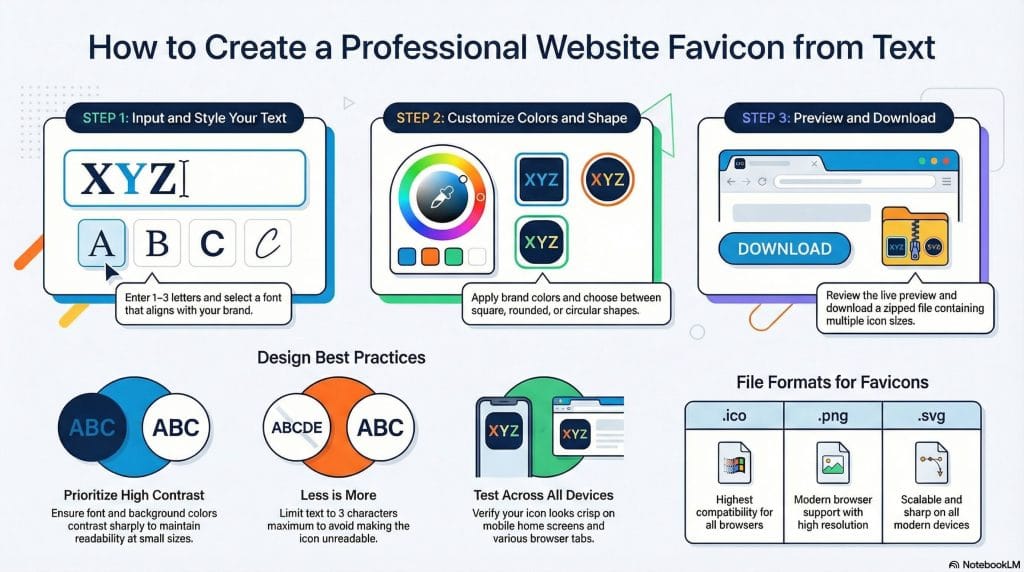
Best Practices for Text -Based Favicons
- Keep it short: 1-3 letters only.
- Use Contrasting Colors: Improves readability
- Test on Multiple Devices: Favicon appears differently on desktop, tablets and mobiles.
- Stay Consistent: Match font and colors with your brand.
Common mistakes to avoid while creating favicon
- Using long text: Becomes unreadable
- Low-contrast colors: Text may not be visible
- Ignoring mobile preview: unreadable on small screens
- Skipping high-resolution tests: blurry on larger screens
Favicon Usecase
I have my blog anilpathak.com.np. I am using green color as my brand colors.
Here, I used my name initials AP as the favicon text and created the favicon from favicon generator from text using the Circle Shape, White Text and Green Background.
Now, you can see the favicon of my site which is professional, readable, memorable and brandable. It is helping my visitors to recognize me.
Conclusion
A favicon generator from text lets anyone create a professional website icon in minutes without any designing experience. You can:
- Make your website look professional and trustworthy.
- Improve user experience
Ready to make your favicon? Use our Favicon Generator From Text now and create your site icon instantly!
Can I use any text for a favicon?
Yes. But using 1-3 letters work best. Longer text becomes unreadable.
Which format is best for a text favicon?
.ico is the most compatible. You can also use .png or .svg that work for modern browsers.
Can I use emojis in a favicon?
Yes. This tool supports emoji as well.
Do favicon help with SEO?
It helps indirectly. Favicon improves user experience, brand recognition and trust, which can influence the engagement metrics.
Can I change my favicon later?
Yes. Just generate a new favicon, download it and upload your site icon.
How to Generator Favicon From Text Online?
You can generate favicon from text online free of cost. No any signup and registration is required. Just visit our page. Enter your Brand Name Short Form, Choose the Background Color and Click On Download Button. It creates favicon in multiple sizes. You can upload the favicon as per your required size.
| Convert Nepali Date into English | Age Calculator Nepali |
| Convert Unicode to Preeti | Preeti To Unicode Converter |
| Fixed Deposit Calculator | EMI Calculator |